Preparing Infrastructure, Part I – Database Stack & Docker Compose
Design goals for the DB stack
The DB stack is its own infrastructure “slice” with clear responsibilities.
Goals
- Isolate database concerns in a separate Docker Compose project (
db-stack) in Synology Container Manager - Run two PostgreSQL instances: one for
portfolio_dev, one forportfolio_pro. - Provide a browser-based admin UI (pgAdmin)
- Implement automated backups to the NAS via a backup container
- Expose the DBs only internally to the Docker network; no direct internet exposure
- Use persistent NAS volumes so data survives container restarts, upgrades, and rebuilds
Directory layout on Synology NAS (db-stack)
The database stack lives under a dedicated folder on the NAS:
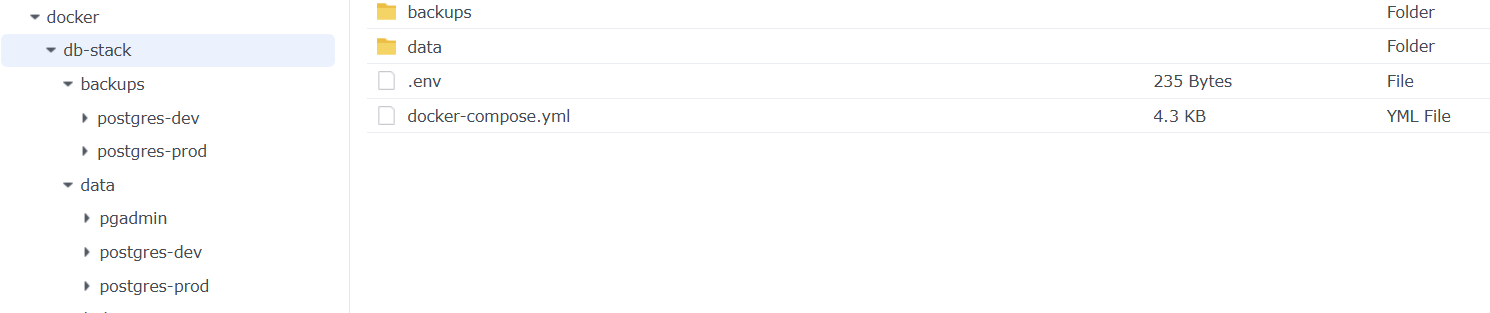
The database stack lives under a dedicated folder on the NAS, inside a shared folder that is protected by Synology’s SHR RAID configuration:
- The path
/volume1/docker/db-stack/sits on a Synology Shared Folder (docker) that uses SHR with disk-redundancy, so a single disk failure should not destroy the database or backup data. - This gives a form of local redundancy at the storage level (RAID), even though the overall service still has a single point of failure at the NAS level.
- In other words, disks can fail without immediate data loss, but if the NAS itself, power, or internet goes down, the portfolio will still be unavailable. High availability at the system level is intentionally out of scope; storage-level protection via SHR is the compromise.
/volume1/docker/db-stack/
 ├─ docker-compose.yml        # Compose file for the db-stack project
 ├─ .env                      # Shared environment variables for DB + pgAdmin + backup
 ├─ data/
 │   ├─ pgadmin/              # Persistent pgAdmin data
 │   ├─ postgres-dev/         # Data for portfolio_dev
 │   └─ postgres-prod/        # Data for portfolio_prod
 └─ backups/
     ├─ postgres-prod/
     │   ├─ daily/
     │   ├─ weekly/
     │   ├─ monthly/
     │   └─ last/
     └─ postgres-dev/
         ├─ daily/
         ├─ weekly/
         ├─ monthly/
         └─ last/
docker-compose.ymldefines the postgres_dev, postgres_prod, pgadmin and backup containers..envcontains credentials and configuration used by the services (not checked into Git).- The
data/folder holds all PostgreSQL and pgAdmin volumes so DB state survives container restarts and upgrades. - The
backups/postgres-prod/tree is used by the backup container to store dumps with a simple rotation scheme (daily,weekly,monthly,last). - The
backups/postgres-dev/tree is used by the backup container to store dumps with a simple rotation scheme (daily,weekly,monthly,last). - Backups are taken from both databases.
portfolio_prodremains the source of truth, but I also back upportfolio_devas a safety net when development work runs for longer periods (feature branches, iterative refactors, or data-heavy experiments). I still refresh development from production data when needed, but now I’m not relying solely on “recreate dev” as the recovery strategy.
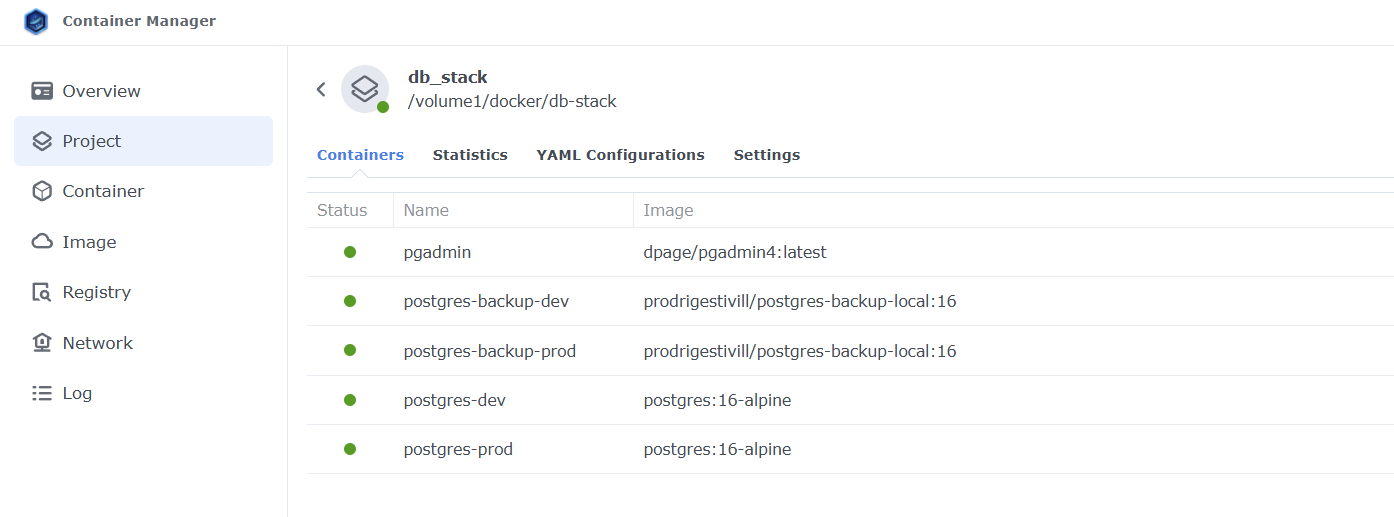
In Synology Container Manager, the db-stack project points to:
/volume1/docker/db-stack/docker-compose.ymlwhich means the entire DB layer (databases, admin UI, and backups) can be started, stopped, or updated as a single, isolated infrastructure unit.
Network design – how services talk to each other
The DB stack uses two Docker networks:
portfolio-network– shared with the portfolio appbackend– internal network for the DB stack itself
Each service is attached to one or both networks depending on what it needs to talk to.
Service-to-network mapping
postgres-prod:
 networks:
   - portfolio-network
   - backend
postgres-dev:
 networks:
   - portfolio-network
   - backend
pgadmin:
 networks:
   - backend
   - portfolio-network
postgres-backup-prod:
 networks:
   - backend
postgres-backup-dev:
 networks:
   - backend
postgres-prod and postgres-dev on both networks
- On
backend:
So they can be reached by pgAdmin and the backup container inside the DB stack.
- On
portfolio-network:
So the portfolio application (and any helper services, like a migration job) in other Compose projects can access them by container name (postgres-prod, postgres-dev).
This lets the application and DB live in separate projects while still talking over an internal Docker bridge instead of going out via host ports.
pgadmin on both networks:
- On
backend:
Needs direct access to postgres-prod and postgres-dev for administration.
- On
portfolio-network:
Keeps the layout flexible: later, if other databases or services join portfolio-network, pgAdmin can reach them without changing the DB stack’s internals.
postgres-backup-prod and postgres-backup-dev only on backend
- Each backup container needs:
- Network access to its respective DB service (
postgres-prodorpostgres-dev) over the internalbackendnetwork. - A mounted NAS volume for
/backups. - There is no reason for backup containers to join
portfolio-network, keeping their connectivity minimal and purpose-specific.
Port mappings and LAN access
Even though all internal communication between services happens over Docker networks (backend and portfolio-network), I expose a few ports on the NAS to make administration and development easier from my local network.
In the documentation, I use example ports (not necessarily the real values in my setup):
postgres-prod:
 ports:
   - "55432:5432"  # example: external port for the production database
postgres-dev:
 ports:
   - "55433:5432"  # example: external port for the development database
pgadmin:
 ports:
   - "58080:80"    # example: external port for the pgAdmin UI
The idea is:
55432→ production database (portfolio_prod)55433→ development database (portfolio_dev)58080→ pgAdmin web UI
This lets me:
- Connect with tools like
psql, DBeaver, etc. directly to the NAS IP and these ports when I am on the LAN. - Open pgAdmin in the browser via
http://NAS-IP:58080to administer both databases.
Key principles:
- These ports are meant for internal admin and development, not for public traffic.
- The firewall/router should ensure these ports are not exposed to the internet.
- All external access to the portfolio site itself goes through the Cloudflared tunnel and nginx-proxy in the application stack, never directly to Postgres or pgAdmin.
This way, the DB stack remains practical to work with in the home lab, while staying aligned with the core idea: the databases are primarily internal resources, not directly exposed services.
Backup strategy
Both databases are backed up by dedicated backup containers (postgres-backup-prod and postgres-backup-dev). Each runs only on the internal backend network and connects to its PostgreSQL service by container name, never via public ports.
- Image & scope
- Uses
prodrigestivill/postgres-backup-local:16. postgres-backup-prodbacks upportfolio_prodinto./backups/postgres-prod/.postgres-backup-devbacks upportfolio_devinto./backups/postgres-dev/.
- Uses
- Schedule & retention
BACKUP_DIR: /backups
SCHEDULE: "@daily"
BACKUP_KEEP_DAYS: 7
BACKUP_KEEP_WEEKS: 4
BACKUP_KEEP_MONTHS: 6
TZ: ${TZ}@dailycreates one backup per day, which is enough for a small, low-traffic portfolio without generating excessive storage usage.- Keeping 7 days covers short-term mistakes (e.g. a bad migration this week).
- Keeping 4 weeks gives a month of history for slower-moving changes.
- Keeping 6 months of monthly backups gives long-term restore points without storing every single dump.
Compressed, timestamped dumps
- Each run creates a compressed
pg_dumpfile in the NAS backup folder, for example:portfolio_prod-20251201.sql.gz

The combination of compression and retention keeps storage usage low while still providing multiple restore points over time.
Automatic updates with Watchtower labels
Each DB-related container is tagged with a Watchtower label:
labels:
 - com.centurylinklabs.watchtower.enable=true
This tells the Watchtower service (running in its own stack on the NAS) to:
- Monitor these containers’ images.
- Pull new images when available.
- Restart the affected containers, currently scheduled around 00:00.
This setup is experimental:
- Nightly restarts can still cause brief disruptions if a container is busy or a migration is running.
- Watchtower itself is somewhat outdated, and I do not plan to rely on it long term.
In the future I expect to replace this with a more controlled solution such as WUD (WatchYourDocker) or Portainer’s update features, where upgrades can be planned and triggered more explicitly rather than on fully automatic schedule.
Docker Compose – DB stack (example configuration)
Below is the final docker-compose.yml for the db-stack project, with example port mappings and all sensitive data loaded from a shared .env file (not committed to Git):
services:
 postgres-prod:
   image: postgres:16-alpine
   container_name: postgres-prod
   restart: unless-stopped
   env_file: .env
   environment:
     POSTGRES_DB: portfolio_prod
     POSTGRES_USER: ${POSTGRES_USER}
     POSTGRES_PASSWORD: ${POSTGRES_PROD_PASSWORD}
     TZ: ${TZ}
   volumes:
     - ./data/postgres-prod:/var/lib/postgresql/data
   ports:
     # Example external port for production DB (LAN only)
     - "55432:5432"
   networks:
     - portfolio-network
     - backend
   healthcheck:
     test: [ "CMD-SHELL", "pg_isready -U ${POSTGRES_USER} -d portfolio_prod" ]
     interval: 10s
     timeout: 10s
     retries: 5
   labels:
     - com.centurylinklabs.watchtower.enable=true
 postgres-dev:
   image: postgres:16-alpine
   container_name: postgres-dev
   restart: unless-stopped
   env_file: .env
   environment:
     POSTGRES_DB: portfolio_dev
     POSTGRES_USER: ${POSTGRES_USER}
     POSTGRES_PASSWORD: ${POSTGRES_DEV_PASSWORD}
     TZ: ${TZ}
   volumes:
     - ./data/postgres-dev:/var/lib/postgresql/data
   ports:
     # Example external port for development DB (LAN only)
     - "55433:5432"
   networks:
     - portfolio-network
     - backend
   healthcheck:
     test: [ "CMD-SHELL", "pg_isready -U ${POSTGRES_USER} -d portfolio_dev" ]
     interval: 10s
     timeout: 10s
     retries: 5
   labels:
     - com.centurylinklabs.watchtower.enable=true
 pgadmin:
   image: dpage/pgadmin4:latest
   container_name: pgadmin
   restart: unless-stopped
   env_file: .env
   environment:
     PGADMIN_DEFAULT_EMAIL: ${PGADMIN_DEFAULT_EMAIL}
     PGADMIN_DEFAULT_PASSWORD: ${PGADMIN_DEFAULT_PASSWORD}
     PGADMIN_CONFIG_SERVER_MODE: "False"
     PGADMIN_LISTEN_ADDRESS: "0.0.0.0"
     PGADMIN_LISTEN_PORT: 80
   ports:
     # Example external port for pgAdmin UI (LAN only)
     - "58080:80"
   networks:
     - backend
     - portfolio-network
   depends_on:
     postgres-prod:
       condition: service_healthy
   labels:
     - com.centurylinklabs.watchtower.enable=true
 postgres-backup-prod:
   image: prodrigestivill/postgres-backup-local:16
   container_name: postgres-backup-prod
   restart: unless-stopped
   env_file: .env
   environment:
     POSTGRES_HOST: postgres-prod
     POSTGRES_PORT: 5432
     POSTGRES_DB: portfolio_prod
     POSTGRES_USER: ${POSTGRES_USER}
     POSTGRES_PASSWORD: ${POSTGRES_PROD_PASSWORD}
     BACKUP_DIR: /backups
     SCHEDULE: "@daily"
     BACKUP_KEEP_DAYS: 7
     BACKUP_KEEP_WEEKS: 4
     BACKUP_KEEP_MONTHS: 6
     TZ: ${TZ}
     HEALTHCHECK_PORT: 8080
   volumes:
     - ./backups/postgres-prod:/backups
   networks:
     - backend
   depends_on:
     postgres-prod:
       condition: service_healthy
   labels:
     - com.centurylinklabs.watchtower.enable=true
  postgres-backup-dev:
    image: prodrigestivill/postgres-backup-local:16
    container_name: postgres-backup-dev
    restart: unless-stopped
    env_file: .env
    environment:
      POSTGRES_HOST: postgres-dev
      POSTGRES_PORT: 5432
      POSTGRES_DB: portfolio_dev
      POSTGRES_USER: ${POSTGRES_USER}
      POSTGRES_PASSWORD: ${POSTGRES_DEV_PASSWORD}
      BACKUP_DIR: /backups
      SCHEDULE: "@daily"
      BACKUP_KEEP_DAYS: 7
      BACKUP_KEEP_WEEKS: 4
      BACKUP_KEEP_MONTHS: 6
      TZ: ${TZ}
      HEALTHCHECK_PORT: 8080
    volumes:
      - ./backups/postgres-dev:/backups
    networks:
      - backend
    depends_on:
      postgres-dev:
        condition: service_healthy
    labels:
      - com.centurylinklabs.watchtower.enable=true
  postgres-backup-dev:
    image: prodrigestivill/postgres-backup-local:16
    container_name: postgres-backup-dev
    restart: unless-stopped
    env_file: .env
    environment:
      POSTGRES_HOST: postgres-dev
      POSTGRES_PORT: 5432
      POSTGRES_DB: portfolio_dev
      POSTGRES_USER: ${POSTGRES_USER}
      POSTGRES_PASSWORD: ${POSTGRES_DEV_PASSWORD}
      BACKUP_DIR: /backups
      SCHEDULE: "@daily"
      BACKUP_KEEP_DAYS: 7
      BACKUP_KEEP_WEEKS: 4
      BACKUP_KEEP_MONTHS: 6
      TZ: ${TZ}
      HEALTHCHECK_PORT: 8080
    volumes:
      - ./backups/postgres-dev:/backups
    networks:
      - backend
    depends_on:
      postgres-dev:
        condition: service_healthy
    labels:
      - com.centurylinklabs.watchtower.enable=true

networks:
 # Shared network with the portfolio app (for blue/green containers to access DB)
 portfolio-network:
   external: true
   name: portfolio-network
 # Internal network for the database stack
 backend:
   driver: bridge
All sensitive values (users, passwords, pgAdmin credentials, timezone, etc.) are stored in .env and injected via env_file: .env, keeping secrets out of the Compose file and the Git repository.