Django Portfolio – Project Goals & Requirements
Why I’m Building This Portfolio?
Most people use LinkedIn to present their professional profile, and I do too. It already shows my roles, education, and certifications well enough. This project is something different.
I am building this portfolio as a live DevOps laboratory: a place where the full development lifecycle is visible, from idea and design through implementation, deployment, and refactoring. Instead of only showing polished end results, I want to document how I explore technologies, how I make architectural decisions, and how I correct them when reality proves me wrong.
This portfolio is therefore:
- A research log
I experiment with different tools (frameworks, databases, CI/CD patterns, observability stacks) and record how they behave in real conditions, on real infrastructure. - An architecture playground
I try out different ways to structure applications, handle environments, manage databases, and design deployment strategies, and I keep the reasoning and trade-offs visible. - A safe place to fail
Not every idea will be “right” the first time. This project intentionally leaves room for mistakes, rollbacks, and redesigns, because that is how I evolve. I need to try → fail → reconsider → do research → try again → do it better. - A continuous improvement loop
Each iteration is an opportunity to ask, “How could this be done better?” and then implement, verify, and document the improvement.
So while it does function as a long-term technical portfolio, its main goal is broader:
to show how I think and work as a DevOps-minded engineer, not just what I have already finished. It is a running narrative of trials, failures, and lessons learned, all anchored in a real, self-hosted system that I maintain and evolve.
Self-hosted, low-cost infrastructure by design
A key requirement for this portfolio is that it must be fully self-hosted, with infrastructure costs kept as close to 0 SEK as possible.
In practice, this means:
- No managed cloud runtime
No dependency on managed cloud platforms to run the application. - No “temporary” free credits
No use of free cloud credits that would later turn into recurring costs. - On-prem hardware only
Everything runs on existing on-prem hardware (Synology NAS and home lab) using containers and virtualisation.
This is not only about saving money. It reflects how I think as both a DevOps engineer and an IT manager:
- Cost awareness at small scale
Even for a personal project, infrastructure choices compound over time. A few euros per month per service quickly becomes real money over years. Designing for near-zero cost forces me to think in terms of total cost of ownership, capacity, and consolidation. - On-prem and virtualisation practice
Many organisations still run hybrid or on-prem environments. By hosting this portfolio on my own NAS, I can practice the same skills required in those environments: resource-constrained optimisation, storage layout, backup strategy, and network configuration, instead of relying on “infinite” cloud resources. - No hidden subsidies
Free cloud credits hide the real price of architectural decisions. For this project, I want a realistic view: if a design cannot be sustained without subsidies, it is not appropriate for a long-running personal system. - Long-term sustainability
The portfolio is intended to run for many years in the background. By anchoring it to hardware I already own and keeping recurring costs close to zero, I reduce the risk that I will have to shut it down or move it because of monthly fees.
In other words, the hosting model is part of the learning goal. The portfolio is not only a showcase of code and infrastructure patterns, but also an exercise in running a small but realistic service with strict cost constraints, using on-prem, virtualised infrastructure that I operate end to end.
Portfolio user & content requirements
From a visitor and content-owner perspective, the portfolio must support:
- Bilingual content (SV/EN)
All main pages and key texts available in both Swedish and English, with easy language switching. - Editable via admin
Content (texts, projects, metadata) managed through an admin interface, without changing code. - File uploads & downloads
Ability to upload CVs, certificates, diagrams, etc., and show clear, structured download links on relevant pages. - Clean, simple UI
Minimalistic design, readable typography, and straightforward navigation focused on core sections like About, Projects, and Contact. - Straightforward navigation
Clear menu structure, no deep nesting, and fast access to the most important sections. - Contact form
Simple, reliable form for visitors to reach me without exposing my email address directly. - External links
Support for linking out to GitHub, LinkedIn, and other resources, clearly indicated as external. - Code snippets display
Support for nicely formatted code blocks (dark/light theme aware) to showcase examples, configurations, and infrastructure snippets.
Core architecture
Separate application & database layers
- The Django application runs in its own container, behind
gunicorn, with static and media files served by the separatenginx-proxyproject. - The database layer lives in the dedicated
db-stackproject on Synology Container Manager and includes:- PostgreSQL containers for
portfolio_devandportfolio_prod pgAdminUI for easier DB administration- A PostgreSQL backup container/image that runs scheduled
pg_dumpjobs and stores dumps on NAS volumes
- PostgreSQL containers for
- Application and database communicate over an internal Docker network only; the database is never exposed directly to the internet.
- Each layer has its own lifecycle: the app can be rebuilt and redeployed without touching the database containers, and DB maintenance (upgrades, backups, restores) can be done independently of the app.
Distinct dev and prod environments
- Separate databases:
portfolio_devfor local experiments, schema changes, and testingportfolio_prodfor the live portfolio, with stricter settings and access control
- Environment-specific settings:
- Django uses different settings modules for dev and prod (e.g.
settings_dev/settings_prod), controlled via environment variables. - Dev enables debug tooling and relaxed email/logging; prod has DEBUG off, stricter security, and production logging.
- Django uses different settings modules for dev and prod (e.g.
- Data flows:
- Regular backups from
portfolio_prodare created by the backup container. - When needed, a sanitized snapshot of prod can be restored into
portfolio_devso new features can be tested against realistic data without risking production.
- Regular backups from
- Deployment separation:
- GitHub Actions with the self-hosted GitHub runner build and push images to the self-hosted Docker registry.
- A prod deployment job pulls images from the registry and restarts only the production app container; dev can be updated separately using its own compose file or manual pulls.
Self-hosted, containerised runtime
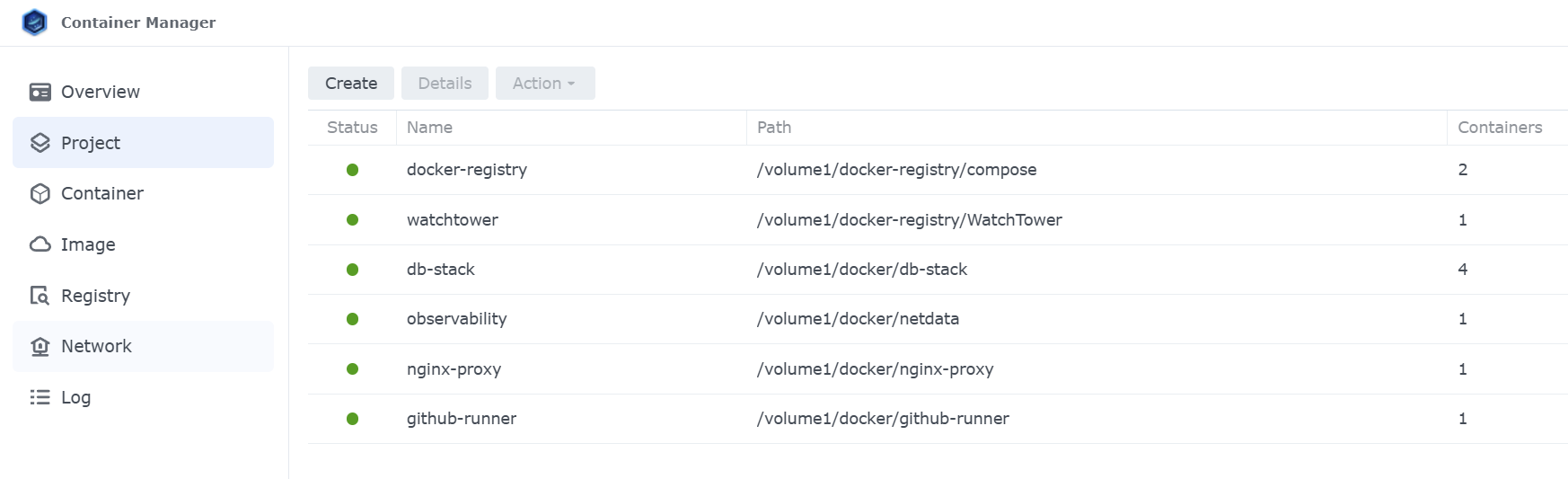
- Everything runs on-prem on the Synology NAS / home lab using Docker, divided into multiple Compose projects in Synology Container Manager for clarity and separation of concerns:
docker-registry– private Docker registry + UI for managing imageswatchtower– automatically monitors and updates containers when new images are availabledb-stack– PostgreSQL (dev/prod), pgAdmin, and backup containerobservability– Netdata for metrics and basic health checksnginx-proxy– reverse proxy for Django, static/media offload, and integration with Cloudflaredgithub-runner– self-hosted GitHub Actions runner for CI/CDportfolio-app– Django 5 + Gunicorn container running the actual portfolio site
- External access is provided via an nginx-proxy + Cloudflared tunnel chain:
- Cloudflared terminates at the NAS and forwards traffic to
nginx-proxy, which routes it to theportfolio-appcontainer over an internal network.
- Cloudflared terminates at the NAS and forwards traffic to
- The frontend uses Bootstrap and vanilla JavaScript inside the Django app, with static assets collected to NAS volumes and served directly by
nginx-proxy. - Netdata watches host and container metrics, giving a lightweight observability layer without any managed cloud services.
Together, this architecture keeps application, database, networking, CI/CD, and observability clearly separated, fully self-hosted, and aligned with the low-cost, on-prem DevOps lab goal.
Tech stack
- Backend: Django 5, Python 3.11
- Frontend: Bootstrap, vanilla JavaScript
- Database: PostgreSQL (separate dev and prod instances)
- DB tooling: pgAdmin UI for easier database management
- DB backups: Dedicated PostgreSQL backup container/image (e.g.
pg_dumpbased), scheduled and stored on NAS - Runtime: Docker, Gunicorn, nginx-proxy (reverse proxy & static/media)
- Image management: Self-hosted Docker registry with web UI
- Automation: Watchtower for automatic container image updates
- Orchestration: Multiple Docker Compose projects in Synology Container Manager
docker-registry(registry + UI)watchtowerdb-stack(PostgreSQL, pgAdmin, backup)observability(Netdata)nginx-proxygithub-runner- separate project for the Django portfolio app
- Hosting: Synology NAS / home lab, on-prem only
- CI/CD: GitHub Actions with a self-hosted GitHub runner on the NAS
- Networking: Cloudflared tunnel for secure external access
- Monitoring: Netdata (or similar) for basic metrics and health checks
Tooling & automation
- AI-assisted workflow
Use tools like Lovable (for UI/layout ideas) and Claude Sonnet / other LLMs (for coding support, refactors, and documentation) as part of the normal development process, not just as one-off experiments. - Self-hosted GitHub runner
CI/CD pipelines execute on a runner hosted in my own environment, building images, running tests, and deploying to the NAS. - Scripted operations
Common tasks (migrations, backups, seed data) are scripted so they can be run repeatably and safely, instead of as ad-hoc manual commands.
Security & reliability
- Basic WAF & protection
Explore using Cloudflare rules and/or other WAF options to protect the portfolio, at least for admin and contact form endpoints. - Simple observability
At minimum: structured logs, container health checks, and a way to inspect basic metrics (Netdata or similar). Over time, experiment with more advanced monitoring options if needed. - Backups & recovery
Regular backups of PostgreSQL databases and media files, stored on the NAS (and optionally replicated elsewhere), with occasional restore tests to verify that the site can be recovered after a failure. - Secrets management
Application secrets (Django secret key, database credentials, mail provider keys) are stored in environment variables and/or GitHub Secrets, not in the repository.
Scope & non-goals
This portfolio is intentionally limited in what it tries to do. It should be usable, easy to read, and technically solid, but not a design showcase.
In scope
- Single-user admin (only I manage content)
- Bilingual content (SV/EN)
- CI/CD from GitHub to Synology NAS
- On-prem, containerised hosting
- Basic observability and logging
- Backup and recovery strategy
- Clean, readable layout with straightforward navigation
Out of scope
- Multi-tenant user accounts or logins
- Heavy analytics or complex tracking
- Full enterprise CMS features (workflows, roles, content versioning, etc.)
- High-traffic optimisation and global scaling
- Mobile app or separate SPA frontend
- Advanced, highly interactive UI or “pixel-perfect” design work (complex animations, heavy JS frontends, etc.)
Redundancy is out of scope for implementation:
With a single on-prem NAS, the system will not have built-in high availability or automatic failover.
- Single point of failure is accepted
I accept occasional downtime in case of hardware issues, power outages, or internet failures to keep infrastructure cost low. - Cost is the main constraint
Adding true redundancy (second NAS, multi-site setup, cloud mirror) would significantly increase cost and complexity, which goes against the “near 0 SEK” goal. - Redundancy treated as an architecture exercise
Instead of implementing it now, I plan to explore and document possible architectures to improve reliability in the future (e.g. secondary node, offsite backups, read-only mirror), including their cost and trade-offs).
Learning objectives
With this project I want to:
- Practice designing and operating a self-hosted, containerised Django application.
- Explore cost-aware architecture choices on small, constrained hardware.
- Use AI tools (Lovable, Claude Sonnet, etc.) as an integrated part of my development workflow.
- Document failures, redesigns, and improvements as a normal part of the lifecycle, not something to hide.
- Strengthen my DevOps mindset by treating even a personal portfolio as a small, real service with environments, CI/CD, observability, and security considerations.